
General FAQs
I’m doing simple projects on my property. Do I need to contact 811?
Yes! You must contact Indiana 811 for all digging projects, such as installing mailboxes, fences, or landscaping.
I hired a contractor or landscaper to do a digging project on my property. Do I still need to contact Indiana 811?
Your contractor is responsible for contacting 811. Before any excavation begins, confirm that they have submitted a ticket with 811, contacted any non-member utilities so buried facilities can be marked with flags or paint, and checked positive response.
Is there a fee to have utility lines marked on my property?
No. Using Indiana 811’s service is always free.
Do I need to notify 811 even if I am digging in an area that has previously been marked?
Yes. You must submit a new ticket for every digging project. Erosion, plant growth, or newly installed utility lines can change the location of buried facilities.
I am only digging in one area and don’t want my entire yard marked. How do I prevent this?
White line the area where you plan to dig. White lining means marking the route or boundary of a proposed excavation or demolition with white paint, flags, or a combination of these.
Does Exactix support phones/tablets?
Yes. For set up instructions, visit our Resources page.
How far in advance should I contact Indiana 811?
Submit your ticket at least two full working days prior to excavation to allow member utilities enough time to mark the approximate location of their underground utilities.
“Working day” means every day except Saturday, Sunday, and state and national legal holidays. Tickets submitted after 7am ET on a working day, that day will not be counted in the notice given to our Member Utilities. All times are in ET.
What do the marks/flags mean?
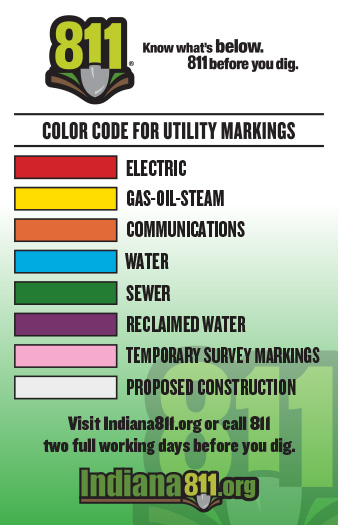
Different colors of paint and/or flags represent a specific underground utility. Refer to the APWA Color Code Guide to identify which colors correspond to which utilities.
What is positive response?
Per the Common Ground Alliance, “Positive Response” is a term used to describe the two types of action taken by a facility owner/operator after it receives notification of intent to excavate. The facility owner/operator must:
1) mark its underground facilities with stakes, paint, or flags; or
2) notify the excavator that the facility owner/operator has no underground facilities in the area of excavation.
“Indiana 811’s Positive Response System” means the status is communicated to Indiana 811 instead of directly to the excavator.
All Operators are required to respond using Indiana 811’s Positive Response System per House Bill 1122.
How do I check positive response through Indiana 811's system?
- With a Single Address Account: log in and check the status from the Responses tab within your ticket (see screenshot below).
- Without a Single Address Account: Enter your ticket number and phone number here and view the Responses tab from within your ticket (see screenshot below).
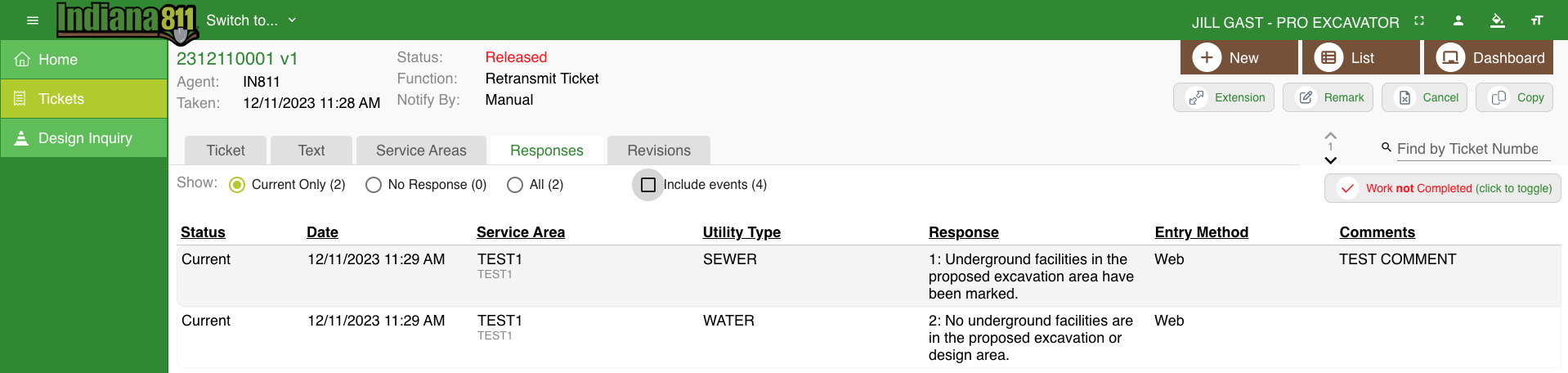
- A list of the Positive Response codes used can be found here.
Do I have to check positive response through Indiana 811's system before I start digging?
Yes. All excavators, including homeowners, must acknowledge Positive Response before starting their projects.
I have private facilities on my property. What do I do?
Some utilities are privately owned and are not marked by Indiana 811 members. Visit our Private Locates page to learn about private facilities and companies that can locate them for a fee.
How do I change information on my existing ticket?
Call the Indiana 811 Contact Center at 811 or 800-382-5544 and provide your ticket number. A Customer Support Representative can assist you.
My requested start date and time have passed, but not all utilities have responded. What do I do now?
If member utilities have not marked facilities or confirmed the area is clear after the requested start date and time on your ticket, call Indiana 811 to request an Additional Notice. Provide your ticket number and the name of the member(s) that did not respond.
Lines have been marked on my property and/or I have received Positive Response. Where should I dig?
Once all Member Utilities have provided a “Closed” Positive Response, you may begin digging carefully, observing the mandated two-foot tolerance zone around all marked utilities. This zone includes all sides of the line – above, below, and in a full radius around the underground and aboveground facility.
- When digging within the tolerance zone, only hand tools are allowed.
- The size of the zone may vary depending on the utility size, sometimes noted by the locating technician.
For example, if a water line is marked as six inches wide, the tolerance zone on all sides of the line is two feet three inches from the mark. Mechanical equipment can only be used outside of the tolerance zone after exposing the line(s) safely with hand tools.

I think I hit a utility line. What should I do?
- Stop digging immediately and step away from the area.
- Call 911 if there is danger, or if flammable, toxic, or corrosive gas or liquid is escaping.
- Notify the affected utility.
- Inform Indiana 811 of the incident.
Exactix FAQs
the blue mapped area does not cover my complete dig site, or the area mapped is too large.
At the bottom of the form, select “No” to the question: “Is the entire dig site located within the blue shaded area on the map?”
Click “Save/Continue” and follow the instructions to Incomplete the ticket and call Indiana 811 for assistance.
I’m trying to create a ticket, but the system says it cannot find my address.
Address options auto-populate in a dropdown. If your address doesn’t appear:
- Make sure the correct county and township are listed.
- Abbreviate street endings (MAIN ‘ST’, SMITH ‘RD’, 1ST ‘AVE’).
- Enter County Roads as ‘CO RT’ with directionals abbreviated (e.g., N CO RT 400 E).
- Remove all punctuation from street names.
I’m attempting to create a single address account BUT HAVEN’t received a validation code.
Check your spam or junk folders. The email will come from tickets@indiana811.org. If using a work or school email, contact your IT department to ensure these emails aren’t blocked.
I am having other issues registering for a single address.
Make sure you are not using a shared email. If you still encounter issues, contact our Online Ticket Support Team at (317) 893-1464 or onlineticketsupport@indiana811.org.
I can not get my single address account to work.
Exactix is not compatible with Internet Explorer. Any other issues or questions can be directed to our Online Ticket Support Team at (317) 893-1464 or onlineticktesupport@indiana811.org.
I'm a professional excavator with a single address account and need to submit tickets for an intersection, multiple addresses or complex sites.
Upgrade to a Pro account for more flexibility that includes editing the map, the ability to Additional Notice, Copy, Cancel your office tickets, and more!
- Take our self-guided training course to learn more.
- Questions? Contact the Online Ticket Support Team at (317) 893-1464 or onlineticketsupport@indiana811.org.