
How can I enter my tickets online?
You must complete a simple training to get set up with a Pro account. More information is available on the Submit a Ticket Page .
Does Exactix Support Phones?
Yes, to set up your mobile device, please visit Exactix Pro Resources for the bookmark instructions.
I’M NOT USING HEAVY MACHINERY. DO I NEED TO CONTACT 811?
Yes! You must contact Indiana 811 for all digging projects, such as installing mailboxes, fences or landscaping.
IS THERE A FEE TO HAVE UTILITY LINES MARKED ON MY JOB SITE?
No. Using Indiana 811’s services are always free.
Do I need to notify 811 even if I am digging in an area that has previously been marked?
Yes, you need to submit a new ticket each time you want to dig.
How far in advance should I contact Indiana 811?
You must contact 811 at least two full working days before beginning any excavation.
A working day is defined as any day except Saturday, Sunday and state or national legal holidays.
Please note: If a ticket is submitted after 7:00 a.m. Eastern Time on a working day, that day will not be counted as part of the required notice period provided to our Member Utilities.
All times given are in Eastern Time (ET).
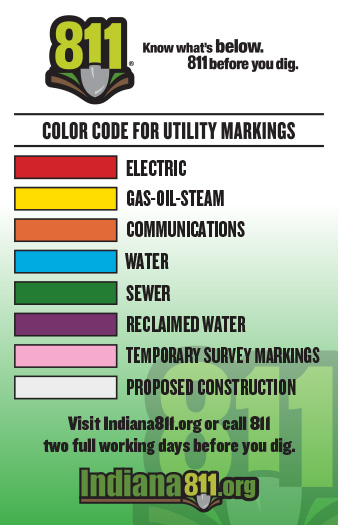
What does the color of the marks/flags mean?
According to law, Member Utilities shall use this color code which indicates the type of underground facility.
What is the tolerance zone?
The law requires a two-foot tolerance zone on either side of the locate marks. This means the tolerance zone includes the entire outer limits of the underground facility — above, below, and in a full radius surrounding the underground facility.
The size of the tolerance zone depends on the size of the underground facility. Utility locating technicians may note the facility width in their markings.
Example:
If a water line is marked as six inches wide, the tolerance zone extends two feet three inches on all sides of the mark.
Mechanical equipment may only be used outside of the tolerance zone, and only after the line has been safely exposed using appropriate hand-digging methods.
To learn more, please review the Indiana Dig Law.
What if the excavation will not be completed by the expiration date?
The original ticket shall remain valid until 11:59 p.m. ET on the expiration date if the markings are not disturbed, damaged, or no longer visible. Update your ticket online, providing at least a 2 full working day notice, if one of the following applies:
- The digging will not be completed by that date
- The markings become no longer visible
- The work location has changed
How to Update:
- If you have a Pro account, use Copy to update an existing ticket.
- If you do not have a Pro account and are a frequent user that would like to upgrade your account, register here to take the self-guided training course.
- A Copy ticket creates a new ticket and lets you change any field.
- You can update locate instructions and remove areas where work is complete to help locators. Be sure to update the map, if needed.
- Attachments do not carry over to a Copy ticket. Please remember to reattach any needed files.
- Only tickets created online can include file attachments.
I think I hit a utility line. What should I do?
Stop digging immediately.
If the damage causes flammable, toxic, or corrosive gas or liquid to escape — or if there is any immediate danger — move away from the area and call 911.
After contacting 911, notify the affected utility.
Finally, report the incident to Indiana 811.
As an Excavator, how do I see Positive Response for the tickets I submitted?
If you have a Pro Account:
- Log in to your Pro account to view the status of your requests. Positive Response information can be found in the Responses tab within your ticket.
- How to View Positive Response with an Exactix Account
If you do not have a Pro account:
- You can still check the status of a request by using the Positive Response lookup tool.
- To view the ticket and responses, enter:
- Your ticket number
- The phone number used on the request
- How to View Positive Response without an Account
AM I REQUIRED TO CHECK INDIANA 811’S POSITIVE RESPONSE SYSTEM?
The person responsible for excavation or design must acknowledge receipt of positive response to their ticket prior to commencing work.
ARE MEMBERS REQUIRED TO USE INDIANA 811’S POSITIVE RESPONSE SYSTEM?
All Member Utilities must use Indiana 811’s Positive Response system to effectively communicate their tickets to the requesting party, reducing the need for additional notices.
What if A POSITIVE RESPONSE is missing OR INCOMPLETE at the requested start date and time?
If a Positive Response is missing or incomplete, you must take action before beginning excavation.
Important: If the markings have become illegible due to weather or excavation, you must submit a new locate request. Do not use an Additional Notice in this situation.
Option 1:
- Submit an Additional Notice online (if your account has permission). If your online account does not allow you to submit an Additional Notice, you must complete the required short training to obtain that permission.
Option 2:
- Contact Indiana 811 by calling 811 or 800-382-5544.
What if Positive Response shows marked but no paint or flags are visible?
If a Positive Response is missing or incomplete, you must take action before beginning excavation.
Important: If the markings have become illegible due to weather or excavation, you must submit a new locate request. Do not use an Additional Notice in this situation.
Option 1:
- Submit an Additional Notice online (if your account has permission). If your online account does not allow you to submit an Additional Notice, you must complete the required short training to obtain that permission.
Option 2:
- Contact Indiana 811 by calling 811 or 800-382-5544.
What are the Positive Response Codes?
The current Positive Response codes and their descriptions can be found here.
When an Excavator views Responses in our system, they will see:
- The Positive Response code
- The description of the code
- Any additional comments provided by the Member Utility or their Locator (if applicable)
What if Members have different different facility types?
Indiana 811 Members can configure the Positive Response sytem in one of the following ways:
- By Service Area – If there is one facility type listed or if the Member would like to enter one response for all facility types (ex: Water, Sewer, Electric, etc.).
- By Utility Type – If multiple facility types are listed under your Service Area and you would like to enter a separate response for each type.
Who can see the response?
Only Excavators who have access to the locate request and the staff at Indiana 811 can view the responses.
Can I view Positive Response on a mobile device?
Yes! You can view Positive Response from a mobile phone or tablet.
Is there a cost to use the Positive Response system?
No, there is no cost to use Positive Response.
Will I be notified when Positive Response information is entered into Indiana 811’s system?
Yes, an email notification will be sent to the email address listed on the ticket based on the following rules:
- Immediately after all Members have responded, OR
- After the two full working day notice has passed, or at the requested start date and time — whichever is later.
Additional Notifications
- If additional responses are entered after the original Positive Response email is sent, a new email will be sent each time a response is added.
What the Email Will Show
- If a Member participates in Positive Response, the status information they provided will be included in the email.
- If a Member does not participate or has not entered a response at the time the email is sent, the status will show: “Has Not Responded.”
Can I respond back to the response I see from the Member as an Excavator?
-
Update ticket information by using the Copy function to create a new ticket.
-
Submit an Additional Notice online (if your account has the appropriate permissions) if you believe the response is incorrect or incomplete.
-
Contact Indiana 811 at 811 or 800-382-5544 to have an Additional Notice submitted regarding an incorrect or incomplete response.